Practical systems for getting work done
Your guide through the tools that run your work.
Build better workflows with Notion, spreadsheets, and automation. Tested guides, practical fixes, and ready-to-use templates for getting more done with less manual work.
Notion & Notes
Tasks, notes and project pages in one place.
Spreadsheets
Numbers, formulas and reports that stay accurate.
Automation
The steps in between run on their own.
Most guides here connect at least two of these. That is the part that saves the hours.
Where do you want to start?
Notion & Notes
Databases, task systems, and notes that hold up under a real workload, not another workspace you open twice.
Notion & Notes guides Work smarter with dataSpreadsheets
The formulas that actually get used, fixes for the errors that eat your afternoon, and sheets you can keep.
Spreadsheets guides Automate repetitive tasksAutomation
Connect the tools you already pay for so forms, data, and reports move without anyone copying them by hand.
Automation guidesFeatured guide
How to start
Zapier + Google Sheets: 5 Workflows That End Manual Copying
Five Zapier and Google Sheets workflows you can set up in one afternoon: form replies into rows, rows into reports, and weekly emails that send themselves.
Read the guideLatest posts

Zapier Storage: How to Remember Values Between Zap Runs
Storage by Zapier keeps values between runs with nothing extra installed. Five minute setup, ten actions, three builds to copy and the limits that break them.

Make.com Operations Limit Exceeded? How to Find the Cause Fast
Make.com operations ran out before month end? Find the four settings that burn them overnight, the scenario to blame, and how to cap each one in ten minutes.

Make.com Bundle Validation Error: What It Means and How to Fix
A bundle validation error stops a Make scenario mid-run. See the four causes, the fields that fix each one, and the error handler that keeps a run alive.

Zapier Won't Turn On a Zap? Work Through These Checks
A greyed-out Publish button or a Zap that flips back to Draft usually comes down to one of six causes. Work through the checks in order to turn the Zap on.

IMPORTRANGE Not Working in Google Sheets: 7 Causes and Fixes
IMPORTRANGE in Google Sheets fails for seven repeatable reasons, from an unapproved connection and a wrong URL to cycles, heavy ranges and blocked copying.

Free Budget Planner Template That Compares Plan vs Actual
Download a free budget planner template for Google Sheets and Excel: set a limit per category, enter what you spent, and see the gap in five formulas.
Quick fixes
All fixesFast, checkable solutions for the errors that interrupt your work: a setting, a range, a formula, and you're moving again.
Templates
Free files, ready to use
Built alongside the guides: a Notion task outline and a spreadsheet you can keep. No sign-up, nothing to buy.
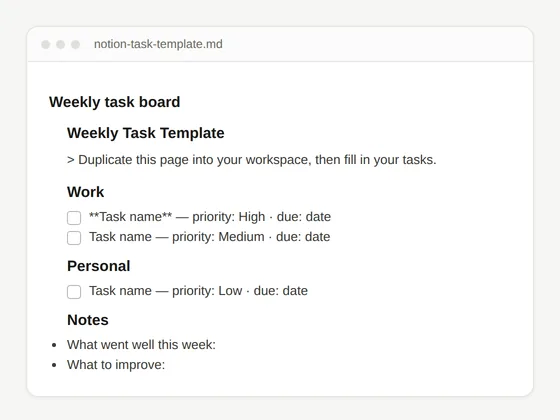 Real file preview
Free Notion Task Template
Build steps plus a starter outline file you paste into an empty Notion page.
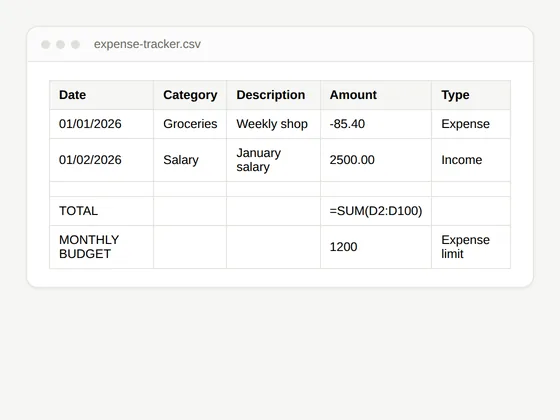 Real file preview
Expense Tracker Spreadsheet
Category totals, a monthly summary, and formulas you can extend.
Steps you can follow
Numbered steps, real menu names, and copy-ready formulas, described the way you'd tell a colleague.
Free files included
Spreadsheet and outline files you can download and use straight away, no sign-up, no email required.
Kept up to date
Every article shows the date it was last updated, and gets revised when the tools change.
Not sure where to start?
Pick the line that sounds like your week
Each card jumps to the matching part of Start Here, with the guides that actually solve it.
Organize my work
Tasks, notes and project pages that stop living in five different places.
Start with organizationWork with data
Formulas, pivot tables and sheets that stay accurate as they grow.
Start with dataAutomate a task
Move forms, rows and reports without anyone copying them by hand.
Start automatingCompare tools
Honest comparisons for the moment you have to pick one and commit.
See the comparisonsFix a problem
Something broke mid-task. Short fixes written for that exact moment.
Go to the fixesEvery week
New guides every week
Practical fixes, complete workflows, and the templates that go with them, published right here on the site. Nothing to sign up for.